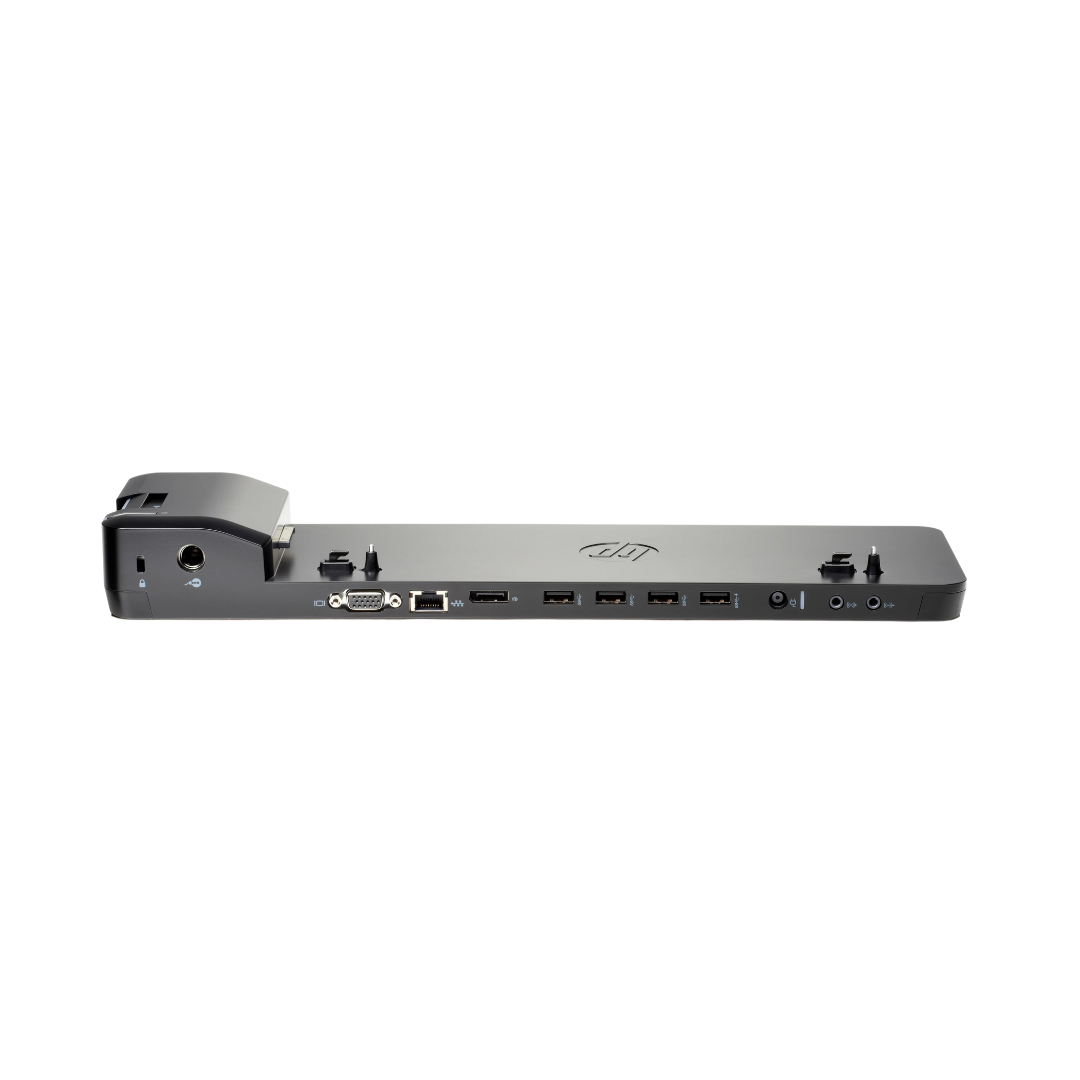
Description HP Ultraslim Docking Station The HP Ultraslim Docking Station delivers seamless connectivity expansion for business professionals seeking efficient workspace organization. This compact docking solution transforms your laptop into a fully-featured desktop workstation through a single connection point. Compatibility and System Requirements Compatible Laptop Models: HP EliteBook 720, 740, 750, 820, 840, 850 series HP ZBook 14u, 15u mobile workstations HP ProBook 640, 645, 650, 655 series Select HP business laptops with proprietary docking connector The HP Ultraslim Docking Station requires laptops equipped with the dedicated docking port located on the bottom panel. This proprietary connection ensures secure attachment and reliable data transfer across all supported interfaces. Connectivity Options and Port Configuration Available Ports: 4x USB 3.0 ports (backward compatible with USB 2.0) 2x DisplayPort 1.2 outputs 1x VGA port (D-Sub 15-pin) 1x Gigabit Ethernet (RJ-45) 1x Audio line-out port 1x Audio line-in/microphone port 1x Power connector (65W/90W adapter support) The dual DisplayPort configuration supports extended desktop arrangements across multiple monitors, accommodating resolutions up to 2560×1600 per display. VGA output provides legacy monitor compatibility for older display systems. Multi-Monitor Display Capabilities The HP Ultraslim Docking Station enables sophisticated multi-monitor setups through its dual DisplayPort and VGA outputs. Users can operate up to three external displays simultaneously while maintaining the laptop’s built-in screen as a fourth display option. Display Configuration Options: Dual 2560×1600 monitors via DisplayPort Triple monitor setup combining DisplayPort and VGA Mixed resolution support across connected displays Extended desktop or mirrored display modes Automatic display detection and configuration Physical Design and Workspace Integration Measuring 14.2 x 5.3 x 1.1 inches, this docking station maintains a minimal desktop footprint while providing comprehensive connectivity. The slim profile allows placement beneath most laptop stands or monitor bases without interfering with workspace ergonomics. Design Features: Horizontal orientation for stable laptop placement Ventilation channels prevent overheating during extended use Non-slip base padding protects desk surfaces Cable management guides organize connection points Status LED indicators confirm docking connection Security and Authentication Features The HP Ultraslim Docking Station incorporates security mechanisms that protect against unauthorized access and data theft. The mechanical docking mechanism requires deliberate action to disconnect, preventing accidental removal during active use. Security Implementations: Kensington security slot for physical theft protection Automatic screen lock upon undocking (software dependent) Secure connection verification through proprietary interface Compatible with HP Client Security Manager software Wake-on-LAN capability for remote system management Power Management and Energy Efficiency This docking station efficiently manages power distribution across connected devices while maintaining laptop charging capabilities. The integrated power adapter supports both 65W and 90W configurations, automatically adjusting output based on connected laptop requirements. Power Specifications: Input voltage: 100-240V AC, 50/60Hz DC output: 19.5V, 3.33A (65W) or 4.62A (90W) USB port power: 2.5W per port maximum Standby power consumption: <0.5W Energy Star qualified design Network Performance and Ethernet Connectivity The integrated Gigabit Ethernet port delivers reliable wired network connectivity, supporting 10/100/1000 Mbps speeds with automatic negotiation. This wired connection provides stable network access for bandwidth-intensive applications and reduces dependency on wireless networks. Network Features: IEEE 802.3ab Gigabit Ethernet compliance Auto-MDIX cable detection Wake-on-LAN support for remote management Network boot capability (PXE support) LED status indicators for link and activity Installation and Driver Requirements The HP Ultraslim Docking Station requires specific drivers for full functionality across all supported operating systems. HP provides comprehensive driver packages through their official support channels, ensuring compatibility with Windows 7, 8.1, and 10 environments. Setup Process: Download HP Docking Station software package Install drivers before first docking session Configure display preferences through Windows settings Test all connectivity options after installation Register product for warranty and support access Business Environment Applications Professional users benefit from the HP Ultraslim Docking Station’s ability to create consistent workspace experiences across different locations. The single-connection docking mechanism eliminates daily cable management while maintaining access to essential peripherals. Workplace Benefits: Rapid desk setup and departure procedures Consistent ergonomic positioning across workstations Reduced wear on laptop ports from repeated connections Centralized cable management for cleaner workspaces Hot-desking compatibility in flexible office environments