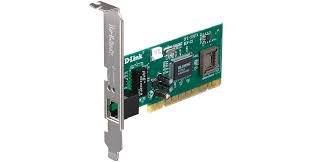
D-Link DFE-530TX 10/100 Fast Ethernet Desktop Adapter
$32.87
$49.63
Description D-Link DFE-530TX 10/100 Fast Ethernet Desktop Adapter Proftech D-Link DFE-530TX 10/100 Fast Ethernet Desktop Adapter provides reliable network connectivity for desktop computers through a PCI expansion card interface, delivering Fast Ethernet speeds up to 100 Mbps for systems lacking built-in network capabilities. This internal network interface card serves as an essential upgrade component for older desktop computers, replacement solution for failed onboard ethernet, or additional network connection for specialized networking scenarios. Unlike USB network adapters that consume external ports and may introduce performance limitations, this PCI-based solution integrates directly into the computer’s expansion bus, providing dedicated network connectivity with full bandwidth utilization. The adapter transforms legacy desktop systems into network-capable workstations, enabling internet access, file sharing, and network resource connectivity without requiring external dongles or adapters. Fast Ethernet Technology and Performance Specifications 10/100 Mbps Auto-Negotiation Capability The D-Link DFE-530TX 10/100 Fast Ethernet Desktop Adapter automatically configures optimal network settings: Fast Ethernet support: Up to 100 Mbps data transmission for modern network requirements Legacy compatibility: 10 Mbps Ethernet support for older network infrastructure Auto-negotiation: Automatic speed and duplex detection for optimal performance Full-duplex operation: Simultaneous send and receive capability doubles effective bandwidth Network Performance and Throughput Real-world performance demonstrates reliable connectivity across various network scenarios: Maximum throughput: 100 Mbps sustained data transfer for file sharing and internet access Low latency operation: Minimal processing delay for responsive network communications Stable connectivity: Consistent performance during extended operation periods Network compatibility: Seamless integration with switches, hubs, and routers from all manufacturers PCI Interface Integration and Installation PCI Expansion Slot Requirements Internal installation provides permanent network connectivity through motherboard integration: Standard PCI slot: Requires available 32-bit PCI expansion slot in desktop computer Low-profile compatibility: Standard height card fits most desktop computer cases Bus mastering: Direct memory access reduces CPU overhead during network operations Plug-and-play detection: Automatic hardware recognition by most modern operating systems Physical Installation Process Installing the D-Link DFE-530TX 10/100 Fast Ethernet Desktop Adapter requires basic computer hardware knowledge: System preparation: Power down computer and disconnect all cables safely Case access: Remove computer case side panel to access PCI expansion slots Slot selection: Choose available PCI slot and remove corresponding case bracket Card installation: Firmly seat network card in PCI slot and secure with screw System reassembly: Replace case panel and reconnect all system cables Operating System Compatibility and Driver Support Comprehensive Platform Support The adapter functions across multiple operating systems with appropriate driver installation: Windows compatibility: Support for Windows 98, ME, 2000, XP, Vista, 7, and later versions Linux support: Compatible with major Linux distributions through built-in or downloadable drivers Legacy OS support: Functionality with older operating systems including Windows 95 and DOS Driver availability: Manufacturer-provided drivers ensure optimal performance and stability Driver Installation and Configuration Setup procedures accommodate various technical skill levels: Automatic detection: Modern operating systems often recognize and configure the adapter automatically Manual driver installation: CD-ROM drivers or downloadable packages for older systems Network configuration: Standard TCP/IP setup through operating system network settings Diagnostic utilities: Included software tools for connection testing and troubleshooting Practical Applications and Use Cases Legacy System Network Integration The adapter addresses connectivity challenges in older computer systems: Older desktop computers: Adding network capability to systems built without integrated ethernet Industrial computers: Networking older manufacturing and control systems for monitoring and updates Legacy servers: Connecting older server hardware to modern network infrastructure Specialized equipment: Providing network access to computers in scientific, medical, or educational equipment Network Card Replacement and Repair Scenarios Various situations benefit from internal ethernet card solutions: Failed onboard ethernet: Replacement connectivity when motherboard network interface fails Upgrade scenarios: Enhanced network capability for systems with slower or unreliable integrated networking Dual network configurations: Secondary network connection for specialized networking arrangements System restoration: Network connectivity restoration for vintage computer systems Technical Specifications and Standards Compliance Ethernet Standards and Protocol Support Comprehensive network protocol compatibility ensures broad infrastructure integration: IEEE 802.3: Standard Ethernet protocol compliance for universal compatibility IEEE 802.3u: Fast Ethernet 100BASE-TX specification support TCP/IP stack: Full internet protocol support for web browsing and network services Network management: SNMP support for enterprise network monitoring and management Physical Layer and Connectivity RJ45 connector: Standard ethernet jack accepts Category 5 or better cables Cable requirements: 100-meter maximum distance using CAT5/5e/6 twisted pair cables Link status LED: Visual indication of network connection and activity Auto-MDIX support: Automatic crossover detection eliminates need for special cables Performance Analysis and Network Integration Bandwidth Utilization and Efficiency Fast Ethernet provides adequate performance for many contemporary applications: Internet browsing: More than sufficient bandwidth for web access and email File transfers: Acceptable performance for small to medium file sharing Network printing: Adequate speeds for document printing to network printers Basic streaming: Supports standard-definition video streaming and audio applications Network Infrastructure Compatibility The adapter integrates seamlessly with various network equipment: Switch connectivity: Compatible with Fast Ethernet and Gigabit ethernet switches Hub integration: Functions with older hub-based network infrastructure Router connections: Direct connection capability to broadband routers and gateways Network bridging: Supports advanced networking configurations when required Installation Environment and System Requirements Computer Hardware Prerequisites Successful installation requires specific system capabilities: Available PCI slot: Open 32-bit PCI expansion slot in desktop motherboard Adequate power supply: Sufficient system power for additional expansion card Physical clearance: Adequate case space for card installation and cable routing BIOS compatibility: System BIOS capable of recognizing and configuring PCI network devices Environmental Operating Conditions Temperature range: Suitable for typical desktop computer operating environments Electromagnetic compatibility: FCC Class B compliance for home and office use Power consumption: Low power usage minimizes impact on system power requirements Heat dissipation: Minimal heat generation requires no additional cooling Limitations and Modern Alternative Considerations Technology Constraints and Performance Boundaries The D-Link DFE-530TX 10/100 Fast Ethernet Desktop Adapter operates within specific technical limitations: 100 Mbps speed limit: Cannot utilize gigabit internet connections or high-speed local networks PCI interface dependency: Requires compatible PCI slot availability in target system Legacy technology: Older networking standard superseded by Gigabit and faster ethernet Driver support: Limited long-term driver availability for newest operating systems When to Consider Alternative Solutions Different networking solutions may provide superior performance for specific requirements: Gigabit requirements: Modern network cards offer 1000 Mbps speeds for high-bandwidth applications USB adapters: External solutions avoid internal installation but may have performance limitations PCIe network cards: Newer expansion bus standard provides enhanced performance and features Integrated solutions: Modern motherboards include built-in gigabit ethernet eliminating add-in card needs Cost-Effectiveness and Value Analysis Budget-Friendly Network Connectivity This adapter provides essential networking capability at minimal cost: Legacy system value: Enables network connectivity for older computers at reasonable expense Repair cost savings: Less expensive than motherboard replacement when onboard ethernet fails Functionality restoration: Returns network capability to systems with failed integrated networking Simple upgrade path: Basic network enhancement for systems requiring connectivity Long-Term Utility and Investment Perspective Understanding the adapter’s role within technology lifecycle management: Legacy support: Continues providing value for older systems requiring network access Replacement availability: Declining inventory as technology becomes obsolete Compatibility concerns: Driver support may diminish with newer operating systems Technology transition: Eventually replaced by faster standards and integrated solutions Installation Support and Troubleshooting Common Installation Issues and Solutions Typical problems and their resolutions help ensure successful deployment: Hardware conflicts: IRQ and resource conflicts resolution through system configuration Driver problems: Proper driver installation and compatibility verification procedures Physical installation: Secure card seating and connection verification techniques Network configuration: TCP/IP setup and network parameter configuration guidance Technical Support and Documentation D-Link provides essential support resources for legacy product installations: Installation guides: Step-by-step hardware installation and software configuration documentation Driver archives: Legacy driver downloads for various operating systems Troubleshooting resources: Common problem resolution and diagnostic procedures Limited support: Reduced technical support availability for discontinued products Enterprise and Professional Applications Business Network Integration The adapter serves specific roles in professional networking environments: Legacy equipment: Maintaining network connectivity for older but functional business computers Industrial applications: Connecting manufacturing and process control systems to corporate networks Point-of-sale systems: Enabling network connectivity for retail and hospitality equipment Specialized workstations: Network access for scientific, medical, or engineering systems Network Administration Considerations Asset management: Inventory tracking for legacy network components Security compliance: Ensuring older systems maintain network security standards Performance monitoring: Network utilization assessment for capacity planning Replacement planning: Long-term strategy for legacy system network connectivity Future-Proofing and Technology Transition Technology Evolution Impact While functional, the adapter represents older networking technology: Speed limitations: 100 Mbps maximum may become inadequate for future applications Standards obsolescence: Fast Ethernet superseded by Gigabit and 10-Gigabit standards Driver support: Ongoing compatibility with newer operating systems uncertain Hardware availability: Replacement cards becoming increasingly difficult to source Migration Planning and Upgrade Strategy System assessment: Evaluating when legacy systems require replacement versus network card upgrade Performance requirements: Determining if Fast Ethernet speeds meet current and future needs Budget planning: Balancing adapter cost against full system replacement expenses Timeline considerations: Planning for eventual system retirement and technology migration