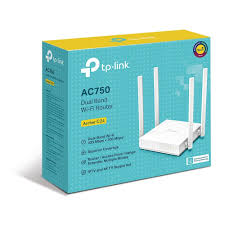
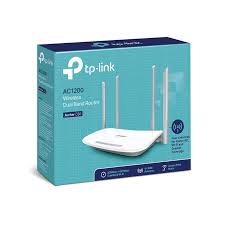
TP-Link Archer C20 | AC750 Wireless Dual Band Router
$17.63
$32.44
Description TP-Link Archer C20 | AC750 Wireless Dual Band Router Proftech TP-Link Archer C20 | AC750 Wireless Dual Band Router provides affordable access to modern dual-band wireless technology, delivering combined speeds up to 750 Mbps across both 2.4GHz and 5GHz frequency bands. This entry-level AC router offers significant performance improvements over single-band routers by automatically distributing devices between frequency bands to reduce network congestion, making it an economical first step into contemporary wireless networking for budget-conscious households. Unlike older single-band routers that force all devices to compete for the same crowded 2.4GHz spectrum, this dual-band design intelligently separates network traffic. The router provides up to 433 Mbps on the cleaner 5GHz band for bandwidth-intensive activities like streaming and video calls, while maintaining 300 Mbps on 2.4GHz for smart home devices and extended-range connections, delivering modern wireless capabilities at an accessible price point. AC750 Dual-Band Technology and Performance Distribution Frequency Band Management and Speed Allocation The TP-Link Archer C20 AC750 Router optimizes home networking through intelligent wireless management: 5GHz AC band: Up to 433 Mbps using 802.11ac standard for modern devices requiring higher bandwidth 2.4GHz N band: Up to 300 Mbps with 802.11n for IoT devices, older equipment, and maximum range coverage Automatic device steering: Router intelligently directs devices to the most appropriate frequency band Independent band operation: Both frequencies function simultaneously without mutual interference Real-World Performance Expectations Practical testing reveals typical throughput in various home networking scenarios: 5GHz close range: 180-250 Mbps within 25 feet of router with modern AC-compatible devices 5GHz medium distance: 100-180 Mbps at 35-50 feet through standard interior walls 2.4GHz extended range: 40-90 Mbps throughout typical apartment and small home environments Mixed device connectivity: Stable performance supporting 6-10 simultaneously connected devices Essential Networking Features and Connectivity Basic Port Configuration and Wired Connectivity Streamlined physical connectivity addresses fundamental home networking requirements: Fast Ethernet WAN port: 100 Mbps connection supporting internet services up to 100 Mbps Four Fast Ethernet LAN ports: Wired connections for essential devices like gaming consoles and desktop computers Auto-negotiation capability: Automatic speed detection for optimal wired device compatibility LED status indicators: Visual confirmation of power, internet connectivity, and network activity Core Router Functionality Essential features provide basic home network management without complexity: Guest network capability: Separate wireless network for visitors with basic access restrictions Parental controls: Simple time-based internet restrictions and basic content filtering Wireless security: WPA2 encryption with password protection for network access Quality of Service: Basic bandwidth management between connected devices Wireless Coverage and Range Capabilities Home Coverage Performance Antenna design and power output provide adequate coverage for smaller residential spaces: Small home coverage: Effective wireless service across homes up to 1,000 square feet Apartment optimization: Ideal coverage for studio, one-bedroom, and small two-bedroom apartments Single-floor performance: Reliable connectivity throughout ranch-style homes and single-story layouts Basic penetration: Adequate signal transmission through standard interior walls and doors Antenna Configuration and Signal Distribution Simple antenna design balances performance with cost-effectiveness: Three external antennas: Fixed-position antennas provide basic omnidirectional coverage MIMO support: 2×2 antenna configuration improves signal reliability on both bands Standard gain design: Adequate antenna performance for typical residential applications Basic beamforming: Limited signal focusing capabilities where supported by client devices Target Applications and Ideal Use Cases Budget-Conscious Home Networking The TP-Link Archer C20 AC750 Wireless Dual Band Router addresses specific affordability-focused requirements: First dual-band upgrade: Economical transition from aging single-band wireless N routers Small household networking: Adequate performance for 1-3 users with moderate internet usage patterns Student housing: Suitable coverage and features for dormitories and shared student apartments Basic streaming needs: Supports HD video streaming on 1-2 devices with appropriate internet service Entry-Level Networking Scenarios Specific situations where budget considerations drive router selection decisions: Starter homes: Young couples and individuals requiring reliable basic connectivity Secondary locations: Guest houses, small offices, or temporary housing situations Limited internet plans: Optimal pairing with internet services under 75 Mbps Technology learning: Introduction to dual-band concepts without significant financial investment Setup Process and User Experience Simplified Installation and Configuration The router provides straightforward setup options for non-technical users: Web-based setup wizard: Browser interface guides through basic internet and wireless configuration TP-Link Tether app: Mobile application provides smartphone-based installation assistance WPS connectivity: One-button setup for compatible wireless devices Quick start guide: Basic instructions accommodate users with minimal networking experience Basic Management Interface Simplified controls focus on essential network management functions: Device overview: View connected devices and basic usage information Wireless settings: Network name and password configuration with basic security options Internet setup: Simple connection configuration for common internet service types Firmware updates: Basic update notifications and installation procedures Performance Analysis and Usage Limitations Speed and Capacity Considerations Understanding realistic performance helps establish appropriate usage expectations: Internet speed matching: Optimal for broadband plans up to 50-75 Mbps Shared bandwidth: AC750 total capacity distributed among all active devices Fast Ethernet constraint: 100 Mbps wired ports may limit higher-speed internet services Device capacity: Performance degrades with more than 8-10 simultaneously active devices Technology Boundaries and Constraints The router operates within specific technical and feature limitations: Entry-level AC implementation: Basic 802.11ac functionality without advanced features Limited processing power: May struggle with demanding networking applications Basic feature set: Lacks advanced networking capabilities found in mid-range and premium routers Minimal customization: Simplified interface provides limited configuration options Cost-Effectiveness and Budget Value Affordable Dual-Band Access This router delivers essential modern wireless technology at minimal cost: Lowest-cost dual-band option: Most economical path to 5GHz wireless capability Single-band upgrade: Meaningful improvement over crowded 2.4GHz-only networks Budget-friendly investment: Minimal financial risk for users exploring wireless networking Basic requirement satisfaction: Includes fundamental modern router capabilities Value Comparison with Alternatives Understanding when different solutions provide better cost-benefit ratios: Single-band routers: Lower cost but lack 5GHz interference avoidance benefits Mid-range AC routers: Higher prices but include gigabit ports and advanced features Mesh systems: Superior coverage but significantly higher costs and complexity Used equipment: Potential savings but without warranty protection and support Installation Environment and Optimal Conditions Physical Placement and Environmental Factors Router positioning becomes critical in smaller coverage areas: Central apartment placement: Positioning near center of living space maximizes coverage effectiveness Elevated positioning: Higher placement improves signal distribution within limited range Interference minimization: Distance from microwaves and baby monitors prevents performance degradation Ventilation considerations: Adequate airflow prevents overheating in compact installations Network Infrastructure Matching Internet service compatibility: Best suited for internet plans between 25-75 Mbps Device ecosystem: Compatible with all Wi-Fi enabled devices regardless of age or manufacturer Usage pattern matching: Optimal for light to moderate internet usage patterns Expansion limitations: May require replacement rather than extension as needs grow Technology Limitations and Upgrade Considerations Performance Boundaries and Constraints The TP-Link Archer C20 AC750 Wireless Dual Band Router operates within specific technical parameters: AC750 speed sharing: Total theoretical bandwidth shared across all devices and bands Fast Ethernet limitations: Wired connections capped at 100 Mbps regardless of internet speed Basic antenna design: Limited range and signal strength compared to higher-end models Simplified firmware: Fewer customization options and advanced networking features When to Consider Alternative Solutions Different networking equipment may provide superior value for specific requirements: Higher internet speeds: Gigabit-capable routers necessary for internet services exceeding 100 Mbps Larger coverage areas: Mid-range routers or mesh systems for homes exceeding 1,000 square feet Advanced features: Business-grade capabilities require more sophisticated equipment Future-proofing: Wi-Fi 6 routers provide longer-term technology relevance Long-Term Value and Upgrade Path Planning Investment Perspective and Technology Evolution Evaluating the router’s role within a progressive networking strategy: Entry-level positioning: Serves as introduction to modern wireless technology concepts Limited lifespan: 1-2 year useful life before upgrade requirements likely emerge Learning opportunity: Provides experience with dual-band networking principles Stepping stone value: Foundation for understanding more advanced networking requirements Replacement Timeline and Indicators Understanding when router replacement becomes necessary or beneficial: Internet service upgrades: Router replacement required when broadband exceeds 75 Mbps Coverage expansion: Home size increases or layout changes may necessitate equipment upgrade Device count growth: Additional connected devices may exceed router capacity Feature requirements: Advanced networking needs develop requiring more sophisticated equipment Basic Troubleshooting and Support Common Issues and Simple Solutions Typical problems and their resolutions help maintain optimal basic performance: Slow wireless speeds: Basic channel optimization and router repositioning Connection dropping: Firmware updates and interference source identification Limited range: Router placement adjustment and obstacle removal Setup difficulties: Factory reset and configuration restart procedures Support Resources and Documentation TP-Link provides essential support infrastructure for entry-level users: Basic setup guides: Simple installation and configuration documentation FAQ resources: Common question answers and basic troubleshooting tips Community support: User forums with basic configuration assistance Limited technical support: Basic warranty coverage and customer service Maintenance and Care Requirements Routine Maintenance for Basic Performance Simple maintenance practices ensure continued reliable operation: Firmware monitoring: Occasional checks for important security and stability updates Physical maintenance: Basic cleaning and connection verification procedures Performance assessment: Periodic speed tests to identify potential issues Configuration backup: Simple settings preservation for potential factory reset scenarios Replacement Planning Considerations Recognizing indicators that suggest router upgrade or replacement: Consistent performance issues: Frequent connectivity problems or slow speeds Internet service incompatibility: Broadband speeds consistently exceed router capabilities Device connectivity limits: Regular problems connecting or maintaining device connections Feature inadequacy: Growing requirements for capabilities not available in entry-level equipment