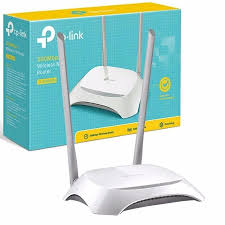
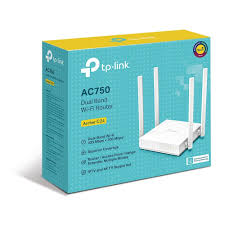
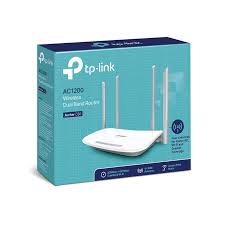
Description TP-Link Archer C24 AC750 Dual-Band Wi-Fi Router Proftech TP-Link Archer C24 AC750 Dual-Band Wi-Fi Router provides affordable access to modern dual-band wireless technology, delivering combined speeds up to 750 Mbps across both 2.4GHz and 5GHz frequency bands. This entry-level AC router automatically distributes devices between frequency bands to reduce network congestion, making it an economical upgrade path for households currently using older single-band wireless N routers. Unlike single-band routers that force all devices to compete for the same wireless spectrum, this dual-band design separates traffic intelligently. The router allocates up to 433 Mbps on the less congested 5GHz band for streaming and gaming, while maintaining 300 Mbps on 2.4GHz for smart home devices and extended-range connections, providing improved performance at a budget-conscious price point. Dual-Band AC750 Technology and Speed Distribution Frequency Band Allocation and Performance The TP-Link Archer C24 AC750 Dual-Band Wi-Fi Router optimizes wireless performance through intelligent band management: 5GHz AC band: Up to 433 Mbps using 802.11ac technology for laptops, smartphones, and streaming devices 2.4GHz N band: Up to 300 Mbps with 802.11n for IoT devices, smart home sensors, and maximum range Automatic band steering: Router directs devices to the most appropriate frequency based on capabilities and network conditions Simultaneous operation: Both bands function independently without interference between frequencies Real-World Performance Expectations Practical throughput testing reveals typical speeds in various home networking scenarios: 5GHz close range: 200-300 Mbps within 30 feet of router with clear line-of-sight 5GHz medium distance: 100-200 Mbps at 40-60 feet through standard interior walls 2.4GHz extended range: 50-100 Mbps throughout typical home environments including distant rooms Mixed device performance: Stable connectivity for 8-12 simultaneously connected devices Home Networking Features and Connectivity Physical Port Configuration Wired connectivity supports standard home networking requirements: Fast Ethernet WAN port: 100 Mbps connection to cable, DSL, or fiber internet services up to 100 Mbps Four Fast Ethernet LAN ports: Wired connections for gaming consoles, desktop computers, and smart TVs Auto-negotiation capability: Automatic speed detection for optimal wired device performance LED status indicators: Visual confirmation of active connections and network activity Essential Router Functionality Core networking features address typical home internet requirements: Guest network support: Separate wireless network for visitors with restricted access to main network Parental controls: Basic time-based internet restrictions and website filtering capabilities Quality of Service: Simple bandwidth allocation between devices and applications Access control: MAC address filtering for device-specific network permissions Wireless Coverage and Range Capabilities Home Coverage Performance Antenna design and power output provide adequate coverage for smaller residential environments: Small to medium homes: Effective wireless service across homes up to 1,200 square feet Single-story performance: Reliable coverage throughout ranch-style homes and apartments Multi-room connectivity: Adequate signal strength for 2-3 bedroom homes with standard construction Basic wall penetration: Signal transmission through typical interior walls and doors Antenna Configuration and Signal Distribution External antenna design optimizes wireless performance within budget constraints: Four external antennas: Fixed-position antennas provide omnidirectional signal coverage MIMO technology: 2×2 antenna configuration on both bands improves signal quality Beamforming capability: Basic signal focusing toward connected devices (where supported) Diversity reception: Multiple antennas reduce dead zones and improve connection stability Setup Process and User Management Initial Installation and Configuration The TP-Link Archer C24 AC750 Dual-Band Wi-Fi Router simplifies home network setup: Web-based setup wizard: Browser interface guides users through internet and wireless configuration TP-Link Tether app: Mobile application provides smartphone-based installation and management WPS connectivity: One-button setup for compatible wireless devices Quick installation guide: Step-by-step instructions for non-technical users Network Management and Monitoring User-friendly interface provides essential network control capabilities: Device management: View connected devices and monitor bandwidth usage Wireless network configuration: SSID customization and password management Basic security settings: Firewall configuration and access control options Firmware updates: Notification and installation of security and performance updates Security Features and Network Protection Wireless Security Protocols Modern encryption standards protect home network communications: WPA3 support: Latest wireless security protocol for enhanced protection against password attacks WPA2 compatibility: Backward compatibility with older devices requiring WPA2 encryption Network isolation: Guest network separation prevents visitor access to main network resources Encryption strength: AES encryption provides robust protection for wireless communications Basic Firewall and Access Control Built-in security features protect against common internet threats: SPI firewall: Stateful packet inspection prevents unauthorized incoming connections DoS protection: Basic defense against denial-of-service attacks Access scheduling: Time-based internet access controls for parental management Website filtering: URL blocking for inappropriate or distracting content Target Applications and Use Cases Budget-Conscious Home Networking The TP-Link Archer C24 AC750 Dual-Band Wi-Fi Router addresses specific residential requirements: First-time dual-band upgrade: Affordable transition from single-band wireless N routers Small family households: Adequate performance for 2-4 users with moderate internet usage Apartment networking: Suitable coverage for studio, one-bedroom, and small two-bedroom apartments Basic streaming needs: Supports HD video streaming on 1-2 devices simultaneously Student and Entry-Level Networking Specific scenarios where budget considerations drive router selection: College housing: Shared apartments and dormitory internet enhancement Starter homes: Young professionals and students requiring basic reliable connectivity Secondary locations: Vacation homes, guest houses, or temporary housing situations Budget internet plans: Optimal match for internet services under 100 Mbps Performance Analysis and Limitations Speed and Throughput Considerations Understanding realistic performance expectations helps set appropriate usage scenarios: Internet speed matching: Optimal for broadband plans up to 75-100 Mbps Shared bandwidth: AC750 total capacity distributed among all connected devices Fast Ethernet constraint: 100 Mbps wired ports may limit very high-speed internet services Device capacity: Performance degrades with more than 12-15 simultaneously active devices Technology Constraints and Boundaries The router operates within specific technical limitations: Entry-level AC technology: Basic 802.11ac implementation lacks advanced features Limited processing power: May struggle with demanding applications or heavy network loads Basic antenna gain: Standard antenna design provides adequate but not exceptional range Simplified feature set: Lacks advanced networking capabilities found in premium routers Value Proposition and Budget Analysis Cost-Effective Dual-Band Access This router provides modern wireless technology at accessible pricing: Dual-band affordability: Least expensive path to 5GHz wireless capability Single-band upgrade: Significant improvement over crowded 2.4GHz-only routers Entry-level investment: Lower financial risk for users uncertain about networking requirements Basic feature completeness: Includes essential modern router capabilities Comparison with Alternative Solutions Understanding when different networking solutions provide superior value: Higher-end AC routers: Offer gigabit ports, advanced features, and better performance Mesh systems: Provide superior coverage for larger homes but at significantly higher cost Wi-Fi 6 routers: Future-proof technology with advanced efficiency but premium pricing Single-band alternatives: Lower cost but lack 5GHz band benefits Installation Environment and Optimal Conditions Physical Placement Strategies Router positioning significantly impacts performance in smaller coverage areas: Central location: Positioning near the center of coverage area maximizes effective range Elevated placement: Higher positioning improves signal distribution to all areas Obstacle minimization: Clear paths to primary usage areas enhance performance Interference avoidance: Distance from microwaves, baby monitors, and other 2.4GHz devices Environmental Operating Parameters Standard home conditions: Designed for typical residential temperature and humidity levels Ventilation requirements: Adequate airflow prevents overheating during continuous operation Power consumption: Energy-efficient operation suitable for 24/7 usage Physical durability: Basic construction adequate for permanent residential installation Upgrade Path and Future Considerations Technology Evolution Planning Understanding the router’s role within advancing home networking standards: Entry-level positioning: Serves as stepping stone to more advanced networking equipment Internet growth accommodation: Adequate for current typical home internet speeds Device expansion limits: May require upgrade as smart home device count increases Feature requirement growth: Users may eventually need advanced capabilities Long-Term Value Assessment Evaluating investment perspective for budget-conscious networking: 2-3 year useful life: Reasonable performance period before considering upgrades Technology learning: Provides experience with dual-band networking concepts Replacement timing: Upgrade when internet speeds or device requirements exceed capabilities Secondary role transition: Potential future use as access point or guest network router Troubleshooting and Support Resources Common Issues and Basic Solutions Typical problems and their resolutions help maintain optimal performance: Slow speeds: Channel optimization and device positioning adjustments Connection drops: Firmware updates and interference source identification Range limitations: Router repositioning and obstacle removal strategies Setup difficulties: Factory reset procedures and configuration restart methods Support Infrastructure and Documentation TP-Link provides essential support resources for entry-level users: Online setup guides: Step-by-step installation and configuration documentation Community forums: User-generated solutions and troubleshooting tips Basic technical support: Assistance with common installation and operation issues Warranty protection: Standard coverage against manufacturing defects